
|
Quick Reference Guide#0 Empty Conveyor |
| STARTUP PROCEDURES |
SHUTDOWN PROCEDURES |
MPAPP OVERVIEW |
LOAD CONVEYOR |
MISSING PIECES |
EMPTY CONVEYOR |
EMPTY SLOTS |
MAINTENANCE SCHEDULE |
ANOMALY GUIDES |
| Step #1) | Partially close Metalprogetti application |
| Within MAP or BAM - press 'ESC' key on keyboard to bring up option menu, then press 'Yes' to exit automatic mode | |

|
|
| Step #2) | Open utility to manage conveyor occupancy |
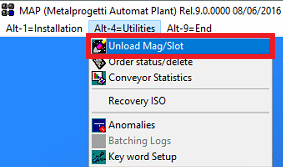
| MAP: Navigate to 'Alt-4=Utilities' at the top left, then select 'Unload Mag/Slot' BAM: Navigate to 'Alt-1=Automatic' at the top left, then select 'Unload Mag/Slot' |
|
|
|
| Step #3) | Enter the administrator password when prompted |
| Type 'metalpro' then press the 'Enter' key on keyboard. | |

|
|
| Step #4) | Select the appropriate option within the utility |
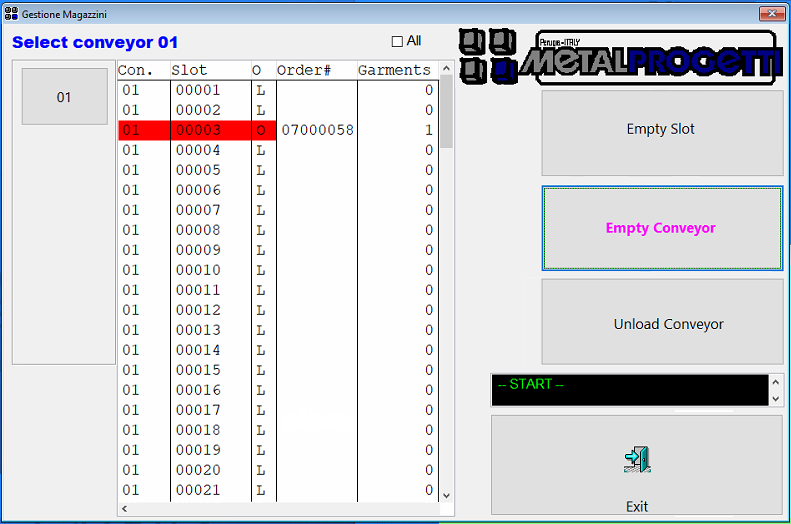
| Click 'Empty Conveyor' button on middle right | |
|
|
| Step #5) | Physically remove all garments from conveyor (if present) |
| Garments will be able to be reloaded once conveyor is synchronized. | |
| Step #6) | Close out of the Conveyor Management utility |
| Click the 'Exit' button in bottom right corner, then launch 'Automatic' mode using 'Alt1=Installation' Menu | |
| Step #7) | Invoke conveyor synchronization |
| Turn off power to the conveyor, wait a couple seconds, then turn on power and push the green 'START' button. If performing at end of day with no need to reload conveyor, skip this step and proceed with Shutdown Procedures. |
|